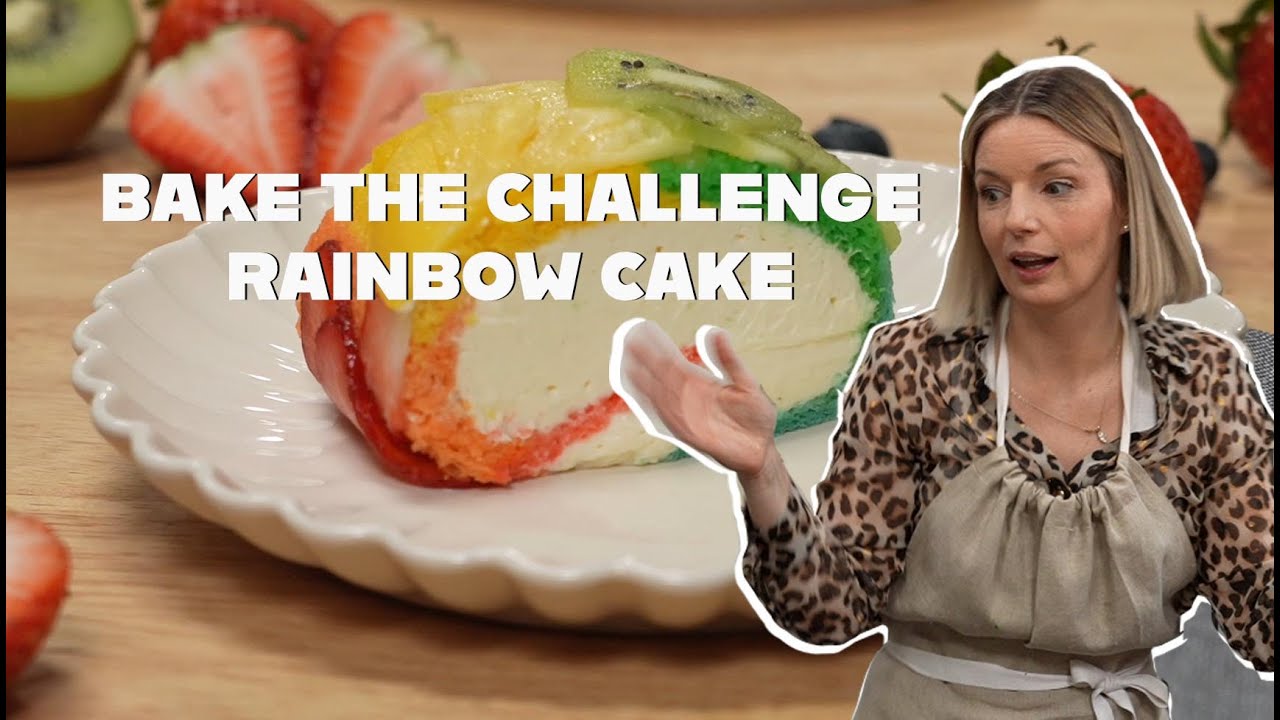
Rainbow Cake | How to Make a Rainbow Cake on Bake the Challenge with Damaris Phillips & Carla Hall

Views
Boost your YouTube video and browse ad-free
See membership →Likes
Dislikes
Comments
Spotlight
Boost yours →YouTube Dislikes are provided by ReturnYoutubeDislike.com.
About Rainbow Cake | How to Make a Rainbow Cake on Bake the Challenge with Damaris Phillips & Carla Hall
🌈 SUMMARY: In “Bake the Challenge: Damaris Phillips Bakes the Rainbow,” by showing how to make a rainbow cake. Damaris channels pure baking creativity to deliver a Swiss roll-inspired Rainbow Layer Cake filled with cheesecake and citrus, layered with passion fruit syrup, and bursting with color. Carla Hall judges the results with her signature blend of warmth and sass—reminding us all that baking is as much about joy and flavor as it is about technique. Starring: Damaris Phillips & Carla Hall This Episode: Bake the Rainbow in 60 Minutes Looking for colorful dessert inspiration? In this vibrant and hilarious episode of Bake the Challenge, Damaris Phillips is given just 60 minutes to bake anything she wants—as long as it looks and tastes like a rainbow. No recipes. No rules. Just creativity, chaos, and a whole lot of color. While Damaris races the clock to create a rainbow cake dessert, Carla Hall watches from the sidelines; serving as both judge and comic relief with her signature wit and charm. 🌈 Why Bake the Rainbow? Because dessert should be fun—and this challenge brings all the color, flavor, and flair you'd want from a show-stopping treat. 💡 Perfect for Date Nights, Parties, or Just Because: Whether you’re planning a celebration or just need a little joy in your day, this episode will leave you smiling—and maybe even craving a technicolor bake of your own. Because dessert should be fun! If you’ve ever wondered how to make a rainbow cake without a recipe, this is your backstage pass. Expect laughter, frosting fails, color debates, and a final result that’s almost too pretty to eat. 🎬 About Bake the Challenge: In this high-energy series, Carla Hall and Damaris Phillips recreate iconic baking challenges inspired by your favorite cooking shows. With no recipes and only their instincts to guide them, they test their skills (and their sanity) in these wildly ambitious and over-the-top dessert showdowns. 🧁 This Episode Highlights: How to make a rainbow cake from scratch—with no recipe Rainbow layer cake techniques (coloring, layering, rolling) Damaris’s Swiss roll cake base and cheesecake filling Carla Hall’s critiques and comic timing Decorating under pressure in 60 minutes Bake the Challenge: Damaris Phillips Bakes the Rainbow | Judged by Carla Hall Welcome to Bake the Challenge, where chaos meets color! In this episode, Damaris Phillips is given just 60 minutes to create a vibrant dessert using at least five different colors. Her bold decision? A Swiss roll-inspired Rainbow Cake (not your average rainbow layer cake) packed with citrus flavor, cheesecake filling, and passion fruit syrup. Meanwhile, Carla Hall provides hilarious commentary and sharp judgment as Damaris navigates time pressure, color decisions, and a few kitchen mishaps. Whether you're curious about how to make a rainbow cake, love watching baking challenges, or need ideas for a rainbow layer cake, this episode has it all. Episode Breakdown – What to Expect: The challenge is set: Bake something rainbow-themed in 60 minutes. No recipe, just creativity. Damaris decides on a citrus-forward rainbow Swiss roll. Carla questions the decision but watches with interest. Mixing colors and planning layers. Damaris considers using fruit and food coloring to achieve a rainbow cake effect. Egg whites whipped to soft peaks. Carla highlights how Damaris separates fats and whites to control flavor and texture. Cake batter is colored and layered into rows. Damaris forgets the salt—uh oh! Bake time! Damaris starts preparing her cheesecake filling and passion fruit simple syrup to balance flavors. The chilled cake comes out. Carla cheers the color but worries about the roll. Final assembly with vibrant filling. The cake holds—barely. Carla counts down the clock. Judging time! Carla praises the flavor and balance, even noting the missing salt was saved by the syrup. Damaris reflects on how tough the challenge was, even for a pro. The duo closes with laughs, lessons, and community love. +++++++++++++++++++++++++++++++++++++++++++++ TOPICS COVERED: Rainbow Cake, How to Make a Rainbow Cake, Rainbow Layer Cake, Bake the Challenge, Carla Hall, Damaris Phillips TAGS: #RainbowCake #HowToMakeARainbowCake #RainbowLayerCake #BakeTheChallenge #CarlaHall #DamarisPhillips
Embed Rainbow Cake | How to Make a Rainbow Cake on Bake the Challenge with Damaris Phillips & Carla Hall's Count on Your Website!
Have you ever wanted to put ANY Social Counter on your own website? We've made it possible with Embed feature!
Simply copy and paste below's code wherever you want to place it on your site!
Or... Do you want to embed our counts in streaming software (such as OBS)? Don't worry, we are supporting that as well!
Simply make new Browser Source and below's string into URL field!
About YouTube Live View Counter
YouTube Live View Counter is the best way to check your Favorite Creator's Statistics updated in real-time! Data seen on Most Social Medias might be inacurate or delayed, that's why Livecounts.io came with idea for YouTube Live View Counter!
Everything is directly taken from official API Service provided by Social Networks. Every single count is updated every 2 seconds and is as accurate as possible.
To search for specific channel simply click "Change User" button below Follower Count Box, type your favorite creator's username and you're good to go! This IS NOT case-sensitive thus you type for example "MrBeast" or "MrBeAsT" and it should still work!
If you're interested in watching Follower Count battle then navigate to Compare Page below Follower Count Box or on Navigation Bar.
Thanks for using YouTube Live View Counter! If you have any idea to improve the website then feel free to get in touch with us it on our Twitter page.
The YouTube Live View Counter explained
What the YouTube Live View Counter does
The YouTube Live View Counter tracks the view count on a single video and refreshes it about every three seconds, the fastest cadence we run. When a big upload or a premiere goes live, YouTube's own view count updates in slow, lumpy jumps and freezes for stretches while it verifies views. This tool reads the public figure far more often, so you see the number climb in something close to real time.
Under the main view count you get three more live stats for the same video: likes, dislikes, and comments. The dislike figure is worth calling out. YouTube hid the public dislike count in 2021, and this counter brings back an estimate so you can still gauge how a video is landing, not just how many people opened it.
How to use it
Want the counter on a stream or a watch-party page? The embed option gives you a widget you can drop in. Want to race two videos, maybe a music video against its rival's? The compare tool puts both view counts side by side.
- 1Paste the video's URL, or search for it by title. A full YouTube link is the surest way to land on the exact video you mean.
- 2Confirm the right video from the results, since popular titles get copied and reuploaded constantly.
- 3Watch the view count climb. The likes, dislikes, and comments update alongside it, and the chart tracks the pace over time.
Why the count moves the way it does
View counting on YouTube is stricter than subscriber counting. YouTube checks that a view is a real person watching, not a bot or an accidental reload, which is why a brand-new video's count can stick at a suspiciously round number before it lurches forward. What you see here mirrors that. During a premiere or a viral spike the number races. Once the initial rush fades it settles into a steadier pace.
All of it is public. This is the same view count sitting on the video's page, pulled more often and shown without the delay YouTube adds when it is busy verifying. We do not inflate anything or add views. We just make the real number easier to watch as it changes.
Reading the chart
The chart under the counter plots every reading, so its slope is a live read on how fast the video is gaining views. A steep climb in the first hour is the sign of a video the algorithm is pushing hard. When the slope flattens, the initial rush is over. Turn on Advanced Metrics to add the total views gained since you opened the page and an average per-minute rate. That is the quickest way to tell a genuine breakout from a video that opened fast and then stalled.
The likes and comments moving in step with views tell you something too. A video gaining views but almost no likes is spreading without landing. Strong likes and comments alongside a climbing view count is the shape of a video people actually care about.
The moments people show up for
A new music video from a major artist is the classic case. Fans open the counter the second it drops to watch the first million, then the first ten million, roll in over the opening hours. Records get set and broken this way, and a live counter is the only place to feel the pace rather than read the recap.
The same goes for anything chasing a landmark. A video creeping toward a billion views pulls a crowd who want to catch the odometer flip. Creators use it too, watching how a fresh upload gathers views in its first hour to judge whether it is breaking out.
Common questions
Why does the count sometimes freeze? YouTube pauses public view counts while it verifies that new views are real, usually on fast-moving videos around round numbers. The counter reflects whatever YouTube is showing, so it freezes when YouTube does, then catches up in a jump.
Where does the dislike number come from? YouTube removed the public dislike count in 2021. The estimate here is built from the data that was public before the change plus ongoing signals, so treat it as a strong estimate rather than an exact figure. Likes and comments stay exact, because those are still public.
Does it work for any video, and is it free? Any public video works. Private, unlisted, or restricted videos that hide their stats cannot be tracked, because the numbers are not public. It is free, with no sign-up. Ads keep it running. Paste a video link and watch.
Track Any Social Media Platform
We've got a wide range of social networks to choose from and track for.




Compare Users of Any Social Media Platform
Have you ever wanted to compare creators across different Social Media Platforms? With Livecounts.io we've made it possible.
From the Blog
Tips, guides, and insights for social media growth